Are you a Roblox developer or a player frustrated by laggy characters and unresponsive game elements? Understanding network ownership in Roblox is crucial for creating smooth, immersive, and enjoyable experiences. This comprehensive guide dives deep into what network ownership is, why it matters for game performance, and how developers can master it to deliver top-tier gameplay. From automatic assignment to manual control and troubleshooting common issues, we cover everything you need to know. For US gamers, who spend an average of 10+ hours per week gaming and value seamless social play, optimizing network ownership means less frustration and more fun, especially across mobile and PC platforms. This resource aims to empower you with the knowledge to build and experience Roblox worlds that truly shine, ensuring every action feels immediate and every interaction is fluid.
What is the core concept of Network Ownership in Roblox?
Network ownership determines which entity (the Roblox server or a player's client) is primarily responsible for simulating and replicating the physics and movement of a game object. For player-controlled items and characters, ownership often transfers to the client for optimal responsiveness, reducing the feeling of lag and making interactions immediate.
How does automatic Network Ownership assignment work in Roblox?
Roblox automatically assigns ownership based on proximity and interaction. Player characters are typically client-owned. For other movable parts, like objects a player picks up or interacts with, ownership usually shifts to the closest client actively involved. This system is designed to balance server load with client-side responsiveness.
When would a developer need to manually adjust Network Ownership?
Developers manually adjust network ownership to force server authority on critical game elements (e.g., central puzzle objects) to prevent exploits or ensure consistent behavior across all clients. They might also assign ownership to a specific client for precise control over complex interactions, or to stabilize objects that frequently 'ping-pong' ownership between players, which can cause network overhead.
What are the benefits of proper Network Ownership management for players?
Proper network ownership management directly benefits players by delivering a smoother, more responsive, and less laggy gaming experience. Actions like moving, jumping, or interacting with objects feel instantaneous. This consistency across the game world enhances immersion, reduces frustration, and makes social interactions within games more fluid and enjoyable for busy adult gamers.
Can incorrect Network Ownership cause lag or visual glitches?
Absolutely. Incorrect network ownership is a leading cause of noticeable lag, desynchronization, and visual glitches. If the wrong client owns an object, it can lead to erratic movement, objects appearing in different places for different players, or actions failing to register properly. Conversely, forcing server ownership on everything can make the game feel sluggish and unresponsive.
How do I troubleshoot Network Ownership issues in my Roblox game?
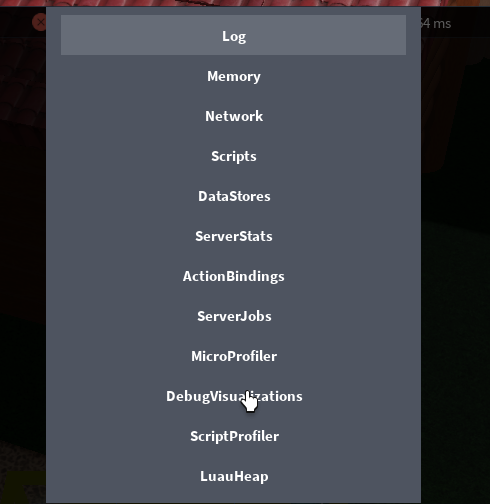
Troubleshooting involves using Roblox Studio's Developer Console (F9) Network tab to monitor physics replication. Simulate network lag in Studio's Test tab to observe behavior under poor conditions. You can also use `Part:GetNetworkOwner()` in your scripts to explicitly check an object's owner at runtime, helping you pinpoint where ownership is being mismanaged or causing problems.
What's the relationship between Network Ownership and client-server communication?
Network ownership is integral to how Roblox manages physics-based client-server communication. When a client owns an object, it directly simulates that object's physics and sends updates to the server. The server then validates these updates and relays them to other clients. This distributed model efficiently shares the processing load, making real-time multiplayer interactions feel responsive without overburdening the central server.
Ever been in a Roblox game where your character glitches, or objects feel unresponsive, even when your internet connection is solid? That frustrating experience, known as 'desync' or lag, often boils down to something fundamental under the hood: network ownership Roblox. For the busy adult gamer in the US, averaging around 36 years old and often balancing gaming with work and family, these hitches can quickly turn a relaxing escape into an irritating chore. We play to unwind, connect with friends, and maybe even build some skills, not to battle phantom latency. With 87% of US gamers regularly diving into virtual worlds and many embracing cross-play across mobile and PC, a smooth, reliable experience is paramount.
This article is your practical guide to understanding and leveraging network ownership in Roblox. Whether you're a developer striving for perfection or a curious player wondering why some games feel so much better than others, we'll demystify this critical concept. We'll show you how proper network ownership management can drastically improve game performance, reduce lag, and create a more responsive, enjoyable social experience for everyone. Let's optimize your Roblox adventures and ensure your playtime is truly stress-free.
What is Network Ownership in Roblox?
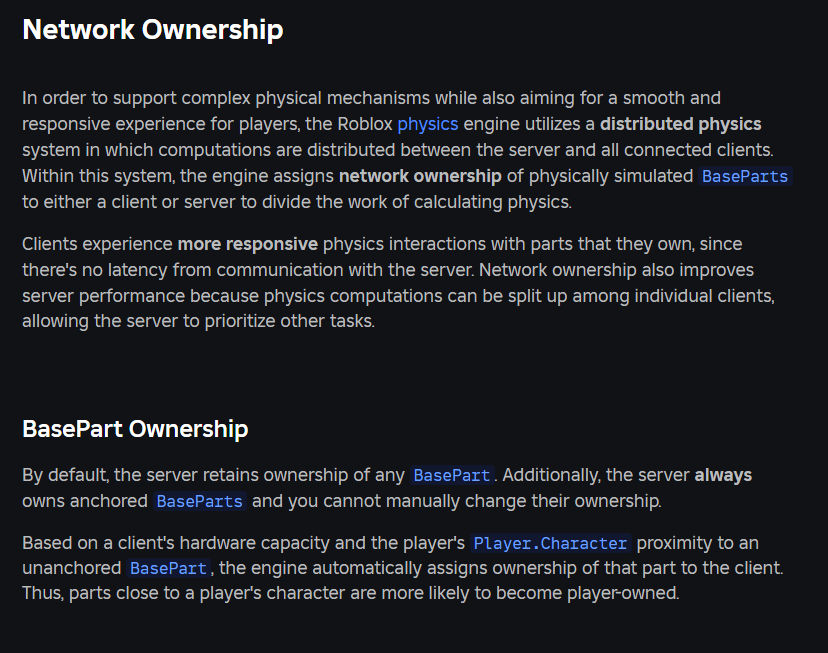
In Roblox, network ownership dictates which client (a player's device) or the server is primarily responsible for simulating and replicating the physics and movement of a particular Part or Model. Think of it as who 'owns' the responsibility for telling everyone else where an object is and what it's doing. By default, the server owns all physical objects. However, for interactive elements like player characters or objects touched by a player, ownership often transfers to the client. This distributed approach helps reduce server load and makes gameplay feel more responsive.
Why is Network Ownership Important for Your Roblox Game?
Network ownership is crucial for performance and responsiveness. When a client owns an object, that client can simulate its movement locally with minimal delay, making actions like walking, jumping, or interacting with items feel instantaneous. The client then sends updates to the server, which validates and replicates these movements to other clients. Without proper ownership, every player action would need to travel to the server, be processed, and then sent back, introducing noticeable lag and making the game feel sluggish. This is especially vital in social gaming experiences, which are a major trend among US gamers this month, where smooth interaction is key to engagement.
How Does Roblox Determine Network Ownership Automatically?
Roblox's engine has a sophisticated system for automatically assigning network ownership. Generally, the server owns all static or non-player-controlled objects. When a player's character spawns, their client automatically takes ownership of their HumanoidRootPart and associated body parts. For other movable parts, like a ball a player kicks or a vehicle they enter, ownership typically transfers to the closest player's client who is actively interacting with it. This automatic system works well for most scenarios, aiming to provide the best local responsiveness while maintaining server authority.
When Should I Manually Set Network Ownership?
While automatic ownership is great, there are specific situations where manual intervention is beneficial or even necessary. Developers often manually set ownership for:
- Server-controlled physics: For critical game elements that absolutely must be authoritative from the server, like a moving platform that could desync if clients had ownership, you'd force server ownership.
- Reducing client-side exploits: If client ownership allows for easy exploitation (e.g., speed hacking a vehicle), forcing server ownership can mitigate this, albeit at the cost of some responsiveness.
- Optimizing for specific interactions: When multiple players are interacting with an object, you might want to cycle ownership or assign it to a specific client to manage complex physics interactions smoothly.
- Preventing ownership 'ping-pong': If objects frequently change ownership between clients, it can lead to replication overhead. Manually assigning ownership can stabilize this.
What Happens if Network Ownership is Incorrectly Managed?
Poor network ownership management is a common culprit for a range of frustrating in-game issues. These can include:
- Severe Lag and Desync: Objects appearing to teleport, rubber-banding characters, or actions not registering properly.
- Visual Glitches: Parts appearing in incorrect positions on different clients.
- Physics Inconsistencies: Collisions behaving differently for various players.
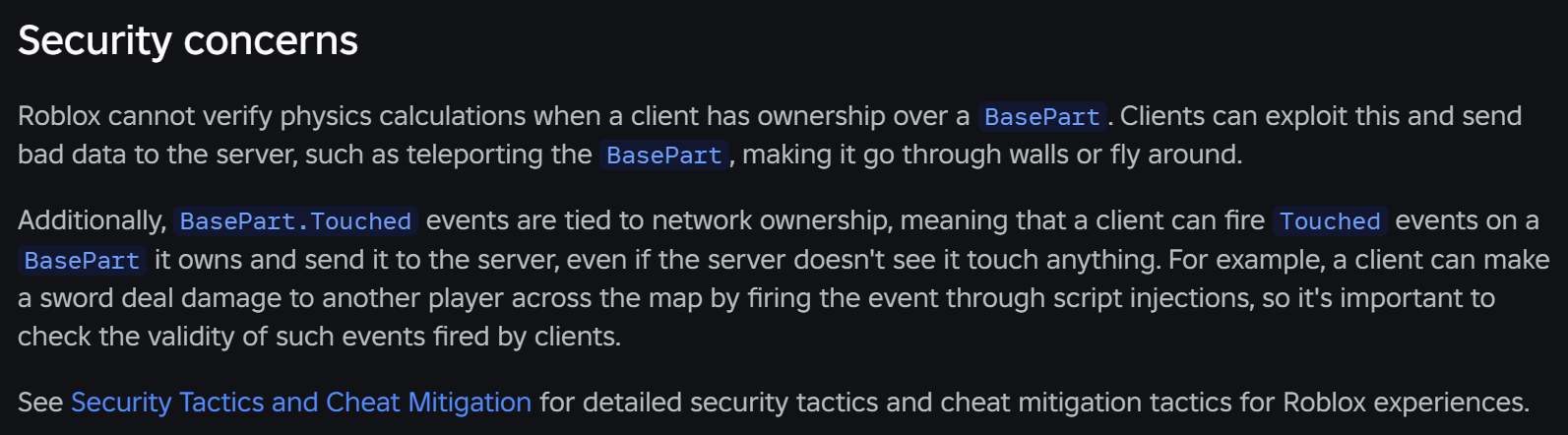
- Exploit Vulnerabilities: If the wrong client owns a critical object, it can be manipulated in unintended ways, leading to cheating.
- Increased Server Load: If the server tries to simulate too many interactive objects when clients could be handling them, it can bog down the entire game experience.
How Can I Optimize Network Ownership for Better Performance?
Optimizing network ownership involves a balance between responsiveness and authority. Here are key strategies:
Understand Default Behavior: Leverage Roblox's automatic system where appropriate. It's often the most efficient for player characters.
Set NetworkOwner to Nil for Server Control: For objects that *must* be server-authoritative (e.g., a critical moving puzzle piece), use
Part:SetNetworkOwner(nil). This ensures the server always simulates its physics.Set NetworkOwner to Player for Client Control: For interactive objects a single player controls, use
Part:SetNetworkOwner(player). This grants them immediate control and responsiveness.Minimize Ownership Changes: Frequent changes in ownership can cause replication spikes. Try to keep ownership stable for objects that aren't constantly being passed around.
Use Anchored Parts When Possible: Anchored parts require no physics simulation and thus no network ownership. If an object doesn't need to move, anchor it!
Consider RemoteEvents for Server-Side Validation: Even with client ownership, use RemoteEvents/Functions to send player input to the server for validation, especially for critical game mechanics, to prevent exploits.
Are There Common Pitfalls with Network Ownership I Should Avoid?
Absolutely. Avoiding these common mistakes can save you a lot of debugging time:
Forcing Server Ownership on Everything: While safe, this will make your game feel incredibly laggy for players, especially if it's an action-oriented game. Responsiveness is key for player satisfaction.
Neglecting Physics Replication: Assuming all physics will 'just work' without understanding ownership can lead to desync. Explicitly consider how each interactive object's physics will behave.
Not Testing Under Network Constraints: Develop and test your game with simulated lag (Roblox Studio has network throttling options) to see how ownership changes impact the experience for players with different internet speeds. This reflects the reality for many US gamers balancing varied home network conditions.
Ignoring Exploit Vectors: Client ownership means a client can lie to the server about an object's position. Always validate critical actions on the server. Gamers these days are savvy, and exploits can quickly ruin a game's reputation.
How Does Network Ownership Impact Multiplayer Experience?
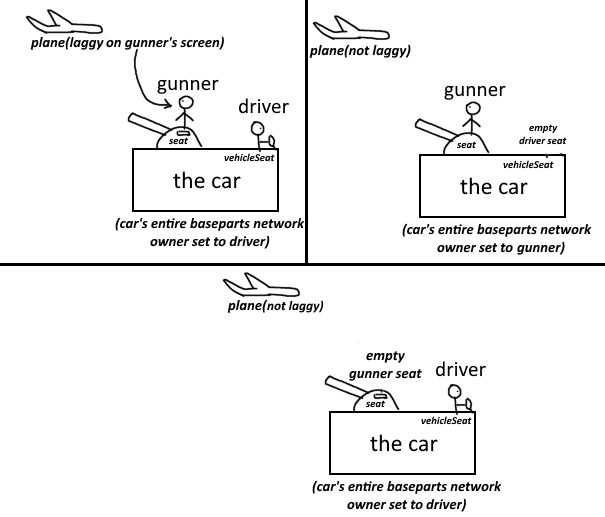
Network ownership profoundly shapes the multiplayer experience. When managed correctly, it ensures all players see a consistent and responsive game world. Imagine a car racing game: if the driver's client owns the car, their experience is smooth. Other players see the car's movement replicated from the server, which received updates from the owner. If ownership is handled poorly, cars might jump around, collide incorrectly, or appear in different locations for different players, turning a fun race into a confusing mess. Social games, a big draw for gamers who use Discord and other platforms to connect, rely on this consistency for shared interactions to feel authentic.
What are the Best Practices for Developers Using Network Ownership?
To master network ownership, adopt these practices:
Default to Client Ownership for Player-Controlled Physics: For player characters, tools, and vehicles, let the client own it for the best responsiveness.
Server Owns Authoritative Game State: Critical objects like leaderboards, game timers, or puzzle elements should remain server-owned to prevent client manipulation.
Use
SetNetworkOwnerJudiciously: Only manually set ownership when there's a clear performance, security, or design reason.Validate Client Input: Always verify client actions on the server. A player might send a movement update for an object they don't own, or for a position that's impossible. Server-side validation is your firewall against exploits.
Profile Network Usage: Use Roblox Studio's built-in profilers to monitor network traffic and physics replication. Identify objects that are causing excessive network load or frequent ownership changes.
Educate Your Team: Ensure all developers on your team understand network ownership principles to maintain consistency and prevent unintended side effects.
How Can I Test and Debug Network Ownership Issues?
Debugging network ownership can be tricky but is essential for a polished game. Here's how:
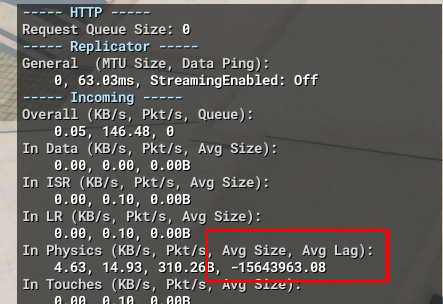
Use Roblox Studio's Network Tools: The 'Developer Console' (F9 in-game, or View > Developer Console in Studio) provides a 'Network' tab. This shows incoming and outgoing network traffic, including physics replication data. Look for high 'Data Received' or 'Data Sent' from specific objects.
Simulate Latency: In Roblox Studio, go to 'Test' tab > 'Client/Server' > 'Current Client' > 'Network' dropdown and select 'Throttled'. This will simulate various network conditions, helping you identify issues that only appear under lag.
Visualize Owner in Studio: During a 'Play Solo' or 'Run' session, select a Part in the Explorer, and in the Properties window, look for the 'NetworkOwner' property. This will tell you who currently owns that part.
Print Statements: Use
print(Part:GetNetworkOwner())in your scripts to explicitly log who owns an object at different points in your game logic.
Understanding network ownership Roblox isn't just for advanced developers; it's a foundational concept that impacts every player's experience. By grasping these principles, you can create games that run smoother, feel more responsive, and offer the seamless, enjoyable social interactions that modern gamers crave. It allows you to build worlds where physics behave predictably and player actions feel immediate, transforming potential frustration into pure fun. Given that most US gamers spend significant time each week on their platforms, ensuring this core technical aspect is solid translates directly into player retention and positive reviews.
What's your biggest gaming challenge when it comes to performance or responsiveness? Comment below! Let's help each other build and enjoy even better Roblox experiences.
FAQ Section
Q: Can network ownership prevent all lag?
A: No, while proper network ownership significantly reduces client-side lag and desync related to physics, it cannot prevent lag caused by slow internet connections, inefficient scripts, or server overload. It's one piece of a larger optimization puzzle.
Q: Does network ownership apply to UI elements?
A: No, network ownership is specifically for physical `Part`s and `Model`s that participate in physics simulation and replication. UI elements are typically handled purely by the client, with data updates communicated via `RemoteEvents`.
Q: What if multiple players interact with one object? Who gets ownership?
A: Roblox's automatic system generally assigns ownership to the closest, most active player interacting with the object. Developers can override this with `SetNetworkOwner()` if specific logic is needed, like assigning to a 'driver' of a vehicle.
Q: Is there a performance cost to constantly changing network ownership?
A: Yes, frequent ownership changes, often called 'ownership ping-pong,' can create network overhead as the engine needs to transfer authority and synchronize the object's state across the network. It's generally better to maintain stable ownership when possible.
What is the core concept of Network Ownership in Roblox?
Network ownership in Roblox dictates whether the game server or a specific player's client is responsible for simulating the physics and movement of a `Part` or `Model`. This system optimizes performance by distributing physics calculations, ensuring player-controlled objects respond instantly on the owning client, while the server primarily validates and replicates these actions to other players. It's fundamental for smooth, responsive gameplay, especially in multiplayer environments where consistency across all devices is crucial.
How does automatic Network Ownership assignment work in Roblox?
Roblox's engine automatically assigns network ownership primarily based on proximity and interaction. Player characters are typically owned by their respective clients, allowing for immediate local input. For other dynamic objects, ownership often transfers to the client of the player who is physically closest to or actively interacting with that object. The server maintains ownership of static objects or those explicitly set to server control, balancing responsiveness with authoritative game state.
When would a developer need to manually adjust Network Ownership?
Developers manually adjust network ownership in specific scenarios for optimization or security. This includes forcing server ownership for critical game elements that require absolute authority (e.g., a central puzzle piece) or for physics-heavy objects prone to exploits if client-owned. Conversely, assigning client ownership to an object controlled solely by one player ensures maximum responsiveness. Manual control provides fine-tuned management beyond Roblox's default, addressing unique game design needs.
What are the benefits of proper Network Ownership management for players?
Proper network ownership management directly translates to a superior player experience. It minimizes frustrating lag and desynchronization, making character movement and object interactions feel immediate and fluid. Players enjoy responsive controls, consistent physics behavior, and a more immersive multiplayer environment where actions register accurately across all clients. This leads to greater satisfaction, reduces bailout rates, and fosters a positive perception of game quality, allowing gamers to truly unwind and enjoy their time.
Can incorrect Network Ownership cause lag or visual glitches?
Yes, absolutely. Incorrect network ownership is a primary cause of lag, desynchronization, and visual glitches. If an object that should be client-owned remains server-owned, player interactions with it will suffer from noticeable input delay. Conversely, if a critical server-authoritative object is incorrectly owned by a client, it can lead to inconsistent physics, objects appearing in different positions for different players, and even open doors for client-side exploits. Proper management is vital for visual and behavioral integrity.
How do I troubleshoot Network Ownership issues in my Roblox game?
To troubleshoot network ownership issues, utilize Roblox Studio's Developer Console (F9) 'Network' tab to monitor replication data. Simulate latency using Studio's network throttling options to test performance under realistic conditions. Use `Part:GetNetworkOwner()` in scripts to log who owns an object at runtime, and check the 'NetworkOwner' property in Studio's Explorer/Properties pane during testing. These tools help identify which parts are causing network strain or unexpected ownership changes, guiding your optimization efforts.
What's the relationship between Network Ownership and client-server communication?
Network ownership is a core aspect of client-server communication in Roblox, particularly for physics replication. When a client owns an object, it sends authoritative physics updates to the server. The server then validates these updates and relays them to other clients. This reduces the server's computational burden by offloading physics to clients while maintaining server authority over the overall game state. It's a fundamental design pattern for achieving real-time, responsive multiplayer experiences across a distributed network.
Understanding Roblox network ownership, improving game performance, client-server synchronization, optimizing player experience, reducing lag and desync, manual network ownership control, troubleshooting common issues.
34


How Does Network Ownership Affect Roblox Player Movement Open World . How To Smoothly Transfer Without Visual Lag 2 1024x576 . O Que NETWORK OWNERSHIP ROBLOX STUDIO YouTube . How Roblox Works 3 6B Revenue Model Explained 2026 FourWeekMBA Who Owns Roblox . Network Ownership Platform Usage Support Developer Forum Roblox

Is There A Possible Way That I Can Get Rid Of Client Server Delay . Who Co Founded Roblox Uncovering The Visionaries Roblox Largest Who Owns It Vs Who Has Control Chart . Who Co Founded Roblox Uncovering The Visionaries Roblox Morgan Stanley Ownership And Voting Power . HOW TO INCREASE NETWORK RECEIVE IN ROBLOX 2026 FULL GUIDE YouTube . Experience Ownership Transfer Issue Roblox Application And Website 2 1380x342

SIM Ownership All Network SIM Database 2026 SIM Ownership - All Network SIM Database 2026 Min 1 768x432 . Roblox New Release Experience Ownership Transfer YouTube . Who Owns FIFA Gianni Infantino FIFA World Cup 2026 Explained 2026 Who Is The Owner Of Roblox.webp. Who Owns PSG Full Ownership Explained Who Owns TBS Complete Ownership. If Car S Network Owner Is Set To Driver It Makes Every Moving Object


Pre Owned 100 Unofficial Roblox Annual 2026 Hardcover Walmart Com 89ee3075 066f 4057 Ac1b . Network Ownership Issue Scripting Support Developer Forum Roblox . Network Ownership Issue Scripting Support Developer Forum Roblox . Clients Trying To Take Network Ownership Even When Forced To Be A . SINCE WHEN DID THIS EXIST Touched Event On Server Fires With Client



Who Owns Roblox The Largest Overview KAMIL FRANEK Roblox Largest Share Ownership Donut Chart . Roblox Is Already The Biggest Game In The World Why Can T It Make A Roblox 2024 3 Page 06 . How To Transfer Ownership Of A Roblox Group 2026 Change Group Owner . Massive Physics Network Ownership Replication Lag Desync Engine Bugs . SIM Ownership All Network SIM Database 2026 SIM Ownership - All Network SIM Database 2026 Min 1536x864


Giving Network Ownership To Non Physical Instances Scripting Support 2 690x149 . Network Ownership Getting Transferred After Being Manually Set 2 690x356 . Experience Ownership Transfer Issue Roblox Application And Website 2 690x306 . How Roblox Network Ownership Works By James Onnen Quenty Medium W . Roblox 20240310


Roblox Is Already The Biggest Game In The World Why Can T It Make A Roblox 2024 2 Page 02 . How To Increase Network Receive In Roblox Improve Network Receive On . Roblox Is Already The Biggest Game In The World Why Can T It Make A Roblox 2024 Page 07 . Who Is The Owner Of Royal Enfield Full Story 2026 Who Is The Owner Of Blox Fruits.webp